
The WordPress Form Builder That Doubles as a Lead CRM
Drag & drop forms, lead inbox with pipeline management, 7-layer spam protection, smart email routing, GDPR tools, webhooks, and CRM integrations — the free version on WordPress.org ships every feature listed below; the optional Pro add-on adds advanced routing rules, webhook retry queues, and extended analytics.
12+
Field Types
7
Spam Layers
5
CRM Integrations
11
Database Tables
How It Works
Create
Pick a template or start from scratch. Drag fields onto the canvas and configure each one.
Customize
Add conditional logic, multi-step layouts, spam protection, and email routing rules.
Embed
Drop the Gutenberg block or a shortcode onto any page, post, or sidebar widget.
Manage
Leads land in your inbox. Tag them, assign them, move them through your pipeline, and sync to your CRM.
Everything You Get
Jump to any feature category
Drag & Drop Form Builder
Build any form visually — no code required
Visual Drag & Drop Editor
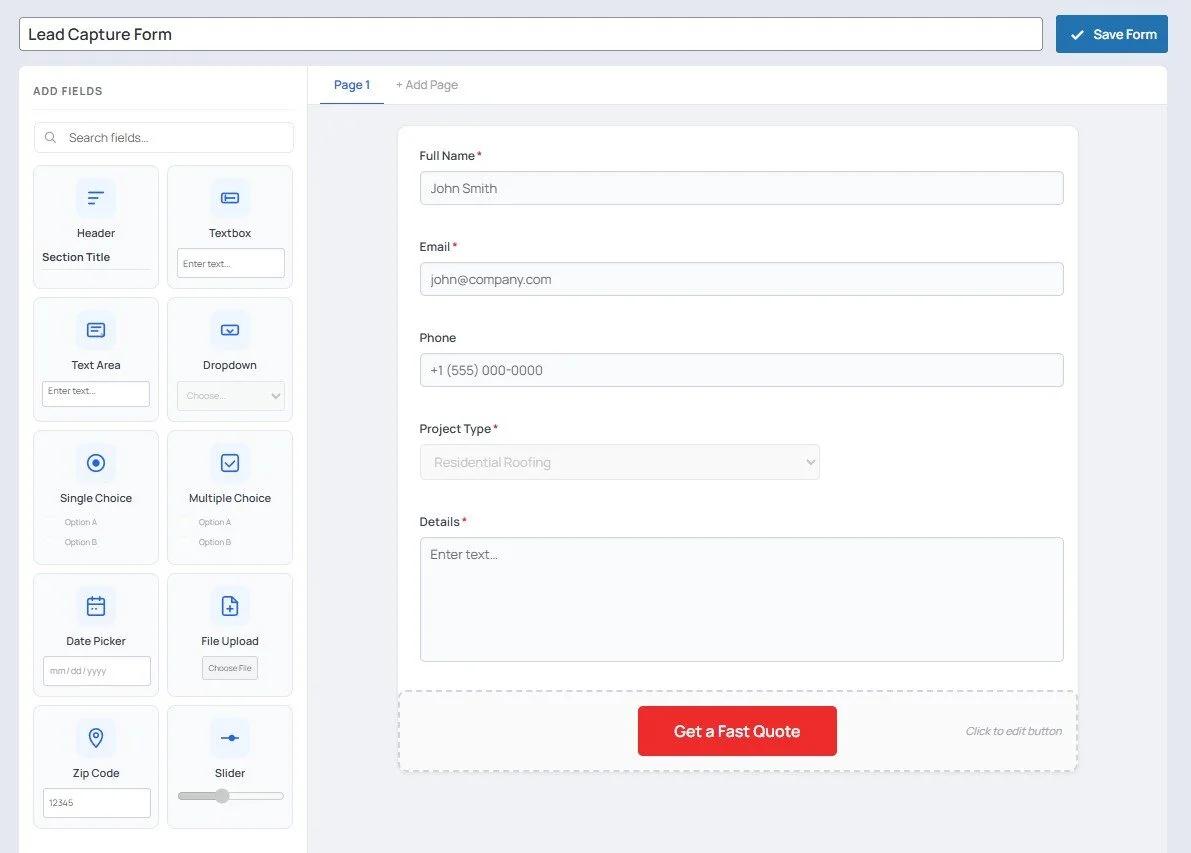
Create any form by dragging fields onto the canvas and rearranging them with a single click. What you see in the builder is exactly what your visitors see. No shortcodes to memorize, no HTML to write.
12+ Field Types
Text, email, phone, textarea, radio buttons, checkboxes, dropdown select, date picker, file upload, hidden fields, heading elements, and consent checkboxes. Every field you need to capture any kind of data.
Conditional Logic
Show or hide any field based on what a visitor has already entered. Ask for a company name only when they select "Business" — or reveal a phone field only when someone ticks "Call me back." Fully configurable rules per field.
Multi-Step Forms with Progress Bar
Break long forms into multiple steps with an animated progress indicator at the top. Studies show multi-step forms increase completion rates by up to 300% — visitors are far more likely to finish a form that feels short.
10 Starter Templates
Hit the ground running with built-in templates: Simple Contact Form, Lead Capture, Business Inquiry, Service Request, Newsletter Signup, Support Ticket, Quote Request, Job Application, and Event Registration. Customize any template in seconds.
Form Scheduling & Expiration
Set an activation date, expiration date, or both. The form automatically appears and disappears on schedule. Show a custom countdown timer before activation and a custom closed message after expiration — no manual toggling needed.
Custom Submit Button & Thank You Message
Change the submit button label to anything — "Send My Request", "Get a Free Quote", "Subscribe Now". After submission, show a fully customized thank you message or redirect to any URL on your site.
Consent Checkbox (GDPR)
Add a required consent field to any form with a custom label and a link to your privacy policy. Consent is recorded with every lead so you have proof of opt-in if you ever need it.
Built-In Lead CRM
Every submission is a lead — manage them all from one inbox
Lead Inbox
Every form submission lands in a searchable, filterable lead inbox. Filter by form, date range, status, tag, or search by name and email. See exactly how many leads each form has generated at a glance.
Lead Status Pipeline
Move leads through a built-in pipeline: New → Read → Contacted → Qualified → Converted → Lost → Archived. Update status in one click. Filter your inbox by any status to focus on exactly the leads that need attention.
Lead Detail View
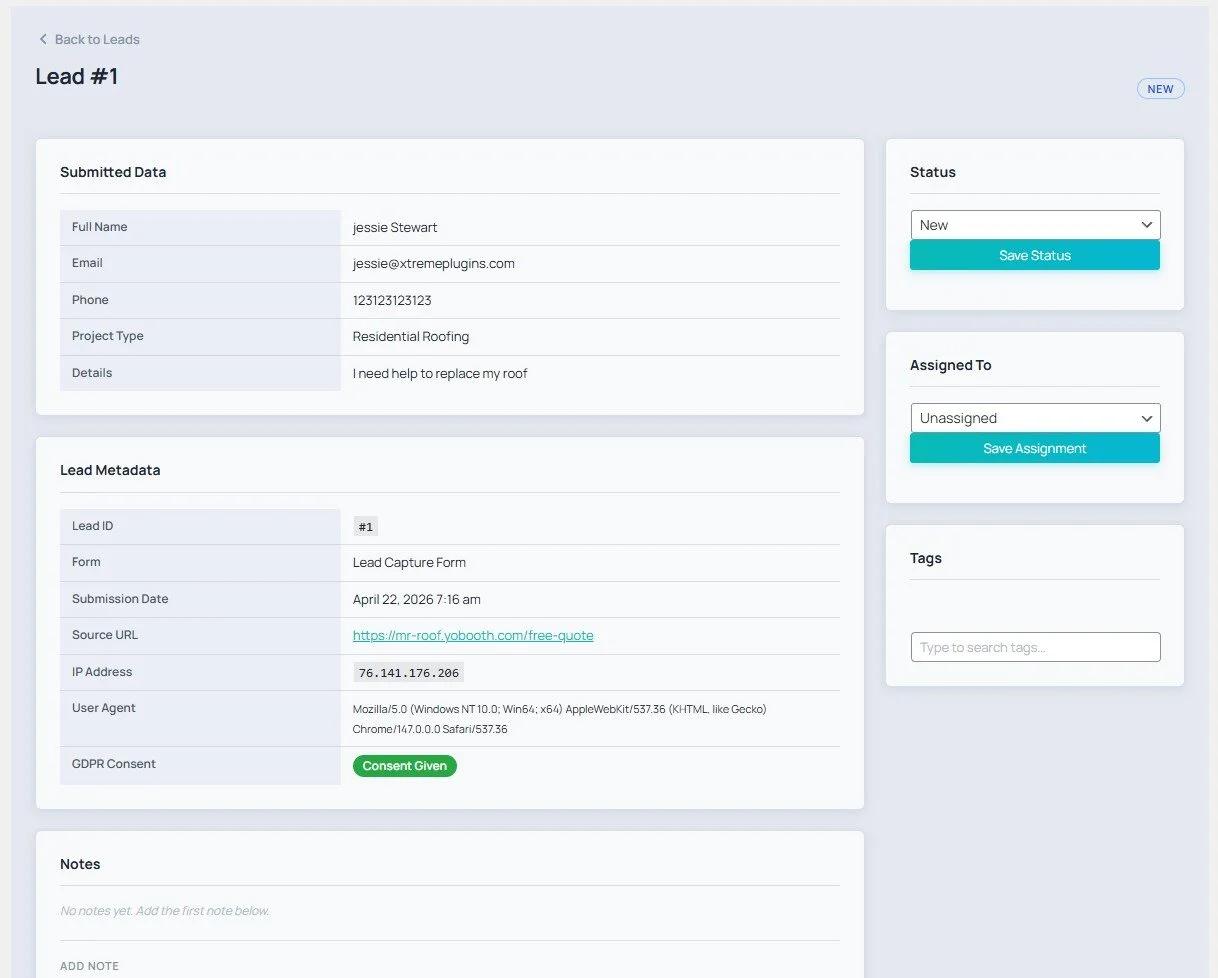
Every lead has a full detail page showing all submitted field values, the source URL the visitor came from, submission timestamp, IP address, browser/device info, and the form it came from. Everything you need in one place.
Internal Notes
Leave private comments on any lead — visible only to your team. Notes are timestamped and attributed to the team member who wrote them. Track call outcomes, next steps, or anything else without cluttering your inbox.
Lead Assignment
Assign any lead to a WordPress user on your team. The assigned user can filter the inbox to see only their leads. Assignment changes are recorded in the activity timeline so nothing gets lost in handoffs.
Activity Timeline
Every lead has a complete chronological history: when it was created, every status change, every team member assignment, every note added, and every tag applied or removed. A full audit trail with zero extra effort.
UTM Attribution
Xtreme Forms automatically captures UTM parameters (source, medium, campaign, term, content) from the URL the visitor submitted from — or falls back to cookie values if the UTM was set earlier in the session. Know exactly which campaign generated each lead.
Source URL & Device Tracking
The exact page URL where the form was submitted, the visitor's browser and OS (user agent), and their IP address are all captured with every lead. See where your best leads are coming from without any extra analytics setup.
7-Layer Spam Protection
Stop bots before they waste your time — without annoying real visitors
Honeypot Field
An invisible field is added to every form that real users never see or fill in. Bots that blindly fill all fields trigger the honeypot and are silently rejected. Zero friction for humans — instant rejection for bots.
Time Gate
Bots fill forms in milliseconds. Xtreme Forms tracks how long a visitor takes from page load to submission and blocks anything that arrives suspiciously fast. Configurable minimum threshold — set it to match real human behavior on your forms.
Google reCAPTCHA v3
Invisible, score-based verification that runs silently in the background. No checkboxes, no image puzzles — visitors never see it. Configure the score threshold (0.1–0.9, default 0.5) to balance security vs. false positives. Can be enabled globally and toggled per form.
Cloudflare Turnstile
A free, privacy-friendly CAPTCHA alternative from Cloudflare. Most visitors are verified completely invisibly. Unlike reCAPTCHA, Turnstile does not track users across sites and requires no Google account. Configure the widget theme (Auto/Light/Dark) and size (Normal/Compact/Flexible). Recommended for GDPR-conscious sites.
Learn more →
Email Domain Blocklist
Block submissions from specific email domains with exact matching. Add one domain per line — disposablemail.org, spam.com, trashmail.net, or any domain you've seen abuse from. Blocked submissions are logged, not silently dropped.
Keyword Blocklist
Block submissions containing specific words or phrases anywhere in any text field. Case-insensitive matching catches all variations. Add casino, buy cheap, free money, or any spam trigger you've identified. Supports 100+ entries.
Spam Log
Every blocked submission is recorded in the spam log with the rejection reason (honeypot, time gate, reCAPTCHA, Turnstile, domain block, keyword block), the submitted email, source URL, IP address, and timestamp. Filter by reason or form to audit your protection.
Duplicate Lead Detection
Catch repeat submissions and handle them your way
Email-Based Deduplication
When a new submission arrives, Xtreme Forms checks whether that email address already exists in your lead database — case-insensitively, so "John@example.com" and "john@example.com" are treated as the same person. A MySQL advisory lock prevents race conditions on high-traffic forms.
Silent Flag Mode
Save the duplicate lead normally but mark it so you know it's a repeat. The visitor sees your normal thank you message and gets their confirmation email. You can filter your inbox to see all duplicates and decide what to do with them later.
Block Mode
Silently reject duplicate submissions and show the visitor a custom message (e.g., "We already have your details — our team will be in touch soon."). Prevents your inbox from filling up with the same contact submitting multiple times.
Merge Mode
Update the original lead record with any non-empty values from the new submission. If a returning visitor has filled in additional fields or corrected their phone number, the original lead automatically reflects the latest information without creating a duplicate.
Advanced Email System
Notify the right people with the right message — automatically
Email Notifications
Send instant email alerts to your team when a new lead arrives. Configure global recipients as a fallback, or override recipients per form. Set a custom "From" name and email so notifications come from your brand.
Auto-Responder (Confirmation Emails)
Automatically send a personalized confirmation email to every person who submits a form. Customize the subject, body, and reply-to address per form. Use merge tags to include their name, form name, or any field value in the response.
Email Routing Rules
Route notifications to different email addresses based on the form or specific field values. If a visitor selects "Sales Inquiry" route to sales@yoursite.com; if they select "Support" route to support@yoursite.com. Set rules to match first or match all for multi-recipient routing.
Merge Tags
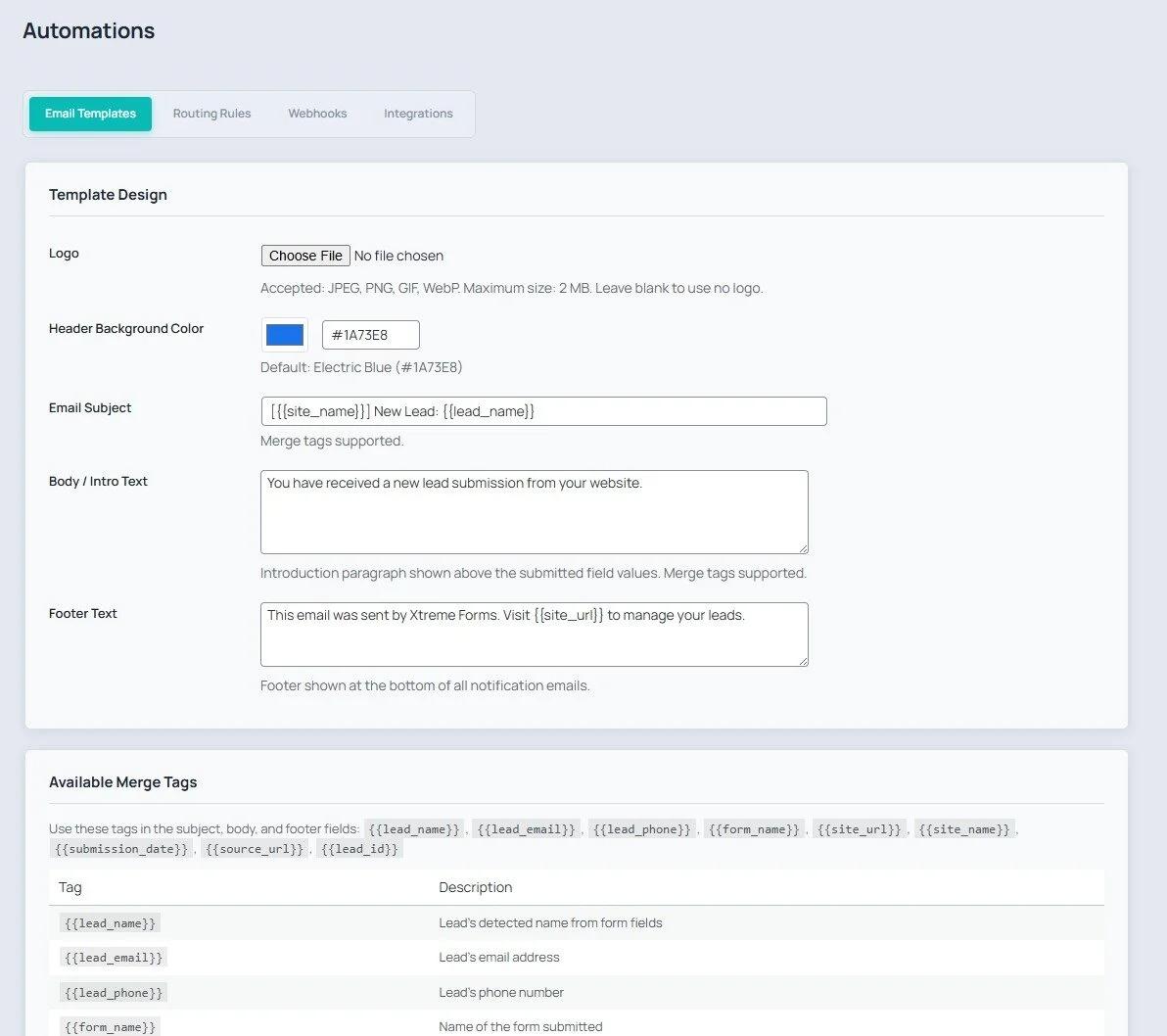
Personalize every email with dynamic values from the submission. Available tags include {{lead_name}}, {{lead_email}}, {{lead_phone}}, {{form_name}}, {{site_url}}, {{submission_date}}, {{source_url}}, {{lead_id}}, {{admin_link}}, {{all_fields}}, and {{site_name}}.
HTML Email Templates
Customize the global email template with your logo URL, brand color, header, body, and footer text. All notifications and auto-responders use the same branded template — keeping your email communications consistent and professional.
Email Log
Every email sent is recorded in the email log — notifications, auto-responders, routing-rule matches, manual resends, and test emails. Filter by lead, trigger type, or delivery status (Sent / Failed / Skipped). View the subject and body of any sent email. Know exactly what was delivered and when.
GDPR & Privacy Compliance
Built-in tools to meet data protection requirements
Right to Erasure
When a user requests their data be deleted under GDPR Article 17, enter their email address in the erasure tool and click Erase All Data. Xtreme Forms permanently deletes every lead record, note, tag, email log entry, and activity event associated with that address — cascade delete with no orphaned records.
Data Retention Policy
Set a maximum age for lead data (in days). A daily background job automatically purges leads older than your threshold, along with all their associated notes, tags, email logs, and activity records. Set it to 365 days for annual retention or leave blank to disable automatic purging entirely.
IP Anonymization
Enable IP anonymization to automatically truncate captured IP addresses on every submission: the last octet of IPv4 addresses is zeroed (192.168.1.0) and the last 80 bits of IPv6 addresses are zeroed. Existing records are not retroactively changed — only new submissions are anonymized after you enable the setting.
Consent Checkbox with Privacy Link
Add a required consent field to any form with a custom label and a clickable link to your privacy policy or terms. Consent status is stored per lead so you have a clear record of who agreed to what and when — essential for demonstrating compliance.
Audit Log
An append-only audit log records every significant action in the plugin: lead status changes, note additions, assignments, deletions, form edits, settings changes, imports, exports, and emails sent. Each entry includes who did it, what they did, which record was affected, and when. Cannot be edited — only viewed.
Webhooks & CRM Integrations
Connect every lead to the tools your team already uses
Outbound Webhooks
Send lead data to any external URL via HTTP POST the moment a new lead arrives or its status changes. Configure multiple webhooks with custom headers, form targeting (one form or all forms), and enable/disable toggles. Every delivery attempt is logged with status (sent/failed) and a response excerpt.
HubSpot Integration
Automatically create or update a HubSpot contact for every new lead. Authenticate with a HubSpot access token, map Xtreme Forms fields to HubSpot contact properties, and test the connection directly from the integrations panel. New leads sync to HubSpot in real time.
Zoho CRM
Push new leads directly into Zoho CRM as contacts or leads. Configure the integration with your Zoho credentials and test the connection before going live. Submissions sync automatically with no manual data entry required.
Salesforce
Connect Xtreme Forms to Salesforce and create new leads or contacts automatically on every submission. All configuration and connection testing happens inside the WordPress admin — no code or Salesforce developer knowledge required.
Pipedrive
Create a new Pipedrive person (and optionally a deal) for every lead submitted through Xtreme Forms. Field mapping, enable/disable toggle, and connection testing are all available in the integrations panel.
Groundhogg CRM
Native integration with Groundhogg — the self-hosted CRM and email automation platform for WordPress. New leads are added as Groundhogg contacts automatically, so your on-premise marketing automation runs the moment a form is submitted.
Import & Export
Back up, migrate, and share your forms effortlessly
Full Plugin Export
Export all settings, all forms, the email template, and all routing rules in a single JSON file — with sensitive keys (reCAPTCHA, API keys) stripped for safety. Use this to back up your entire Xtreme Forms configuration or migrate it to a new site.
Single-Form Export
Export any individual form as a JSON file including all its fields, settings, status, scheduling, and closed message. Share forms across sites or keep per-form backups without exporting everything.
JSON Import
Import a previously exported file to restore settings and forms. Xtreme Forms validates the file before importing, handles legacy form structures, deduplicates forms to avoid double-importing, and merges settings rather than overwriting them. Error messages explain exactly what went wrong if a file is invalid.
WordPress Multisite Support
Full network support with per-site isolation and network-level management
Per-Site Data Isolation
On a WordPress multisite network, every site gets its own set of database tables — forms, leads, tags, logs, and settings are completely isolated between sites. A lead on Site A never appears in Site B's inbox.
Network Admin Dashboard
Superadmins get a network-level dashboard that aggregates data across all sites: total leads, top-performing forms, and submission trends across the entire network at a glance.
Network Settings Push
Configure reCAPTCHA keys, Turnstile credentials, or email settings once at the network level and push them to all subsites with a single click. Saves hours of repeated configuration on large networks.
Per-Site Opt-Out
Individual site admins can opt their site out of Xtreme Forms entirely if the plugin isn't needed on their site. The plugin remains network-active but doesn't appear in that site's admin menu.
Cloudflare Turnstile
Smart bot protection — free & privacy-friendly
Turnstile is Cloudflare's smart CAPTCHA alternative. Xtreme Forms provides a native integration that effectively protects your forms from spam bots. Unlike Google reCAPTCHA, Turnstile is completely free and does not track your visitors across the web. We recommend Turnstile for all sites — especially those with GDPR requirements.
Getting Started
Obtain a Site Key and a Secret Key from your Cloudflare dashboard (free account required). Then go to WordPress → Xtreme Forms → Settings, scroll to the Cloudflare Turnstile section, paste your keys, enable the integration, and save. Every form on your site immediately shows the Turnstile widget.
Widget Options
- →Theme — Auto (matches visitor's system preference), Light, or Dark.
- →Size — Normal, Compact, or Flexible (adapts to its container width).
Why Turnstile over reCAPTCHA?
- ✓Completely free — no billing or usage limits for most sites.
- ✓Privacy-first — does not build ad profiles or track users across sites.
- ✓No puzzles — most visitors are verified invisibly in the background.
- ✓GDPR-compliant with minimal data processing.
- ✓Can be run alongside reCAPTCHA v3 for double-layer protection.
Tech Stack
Screenshots
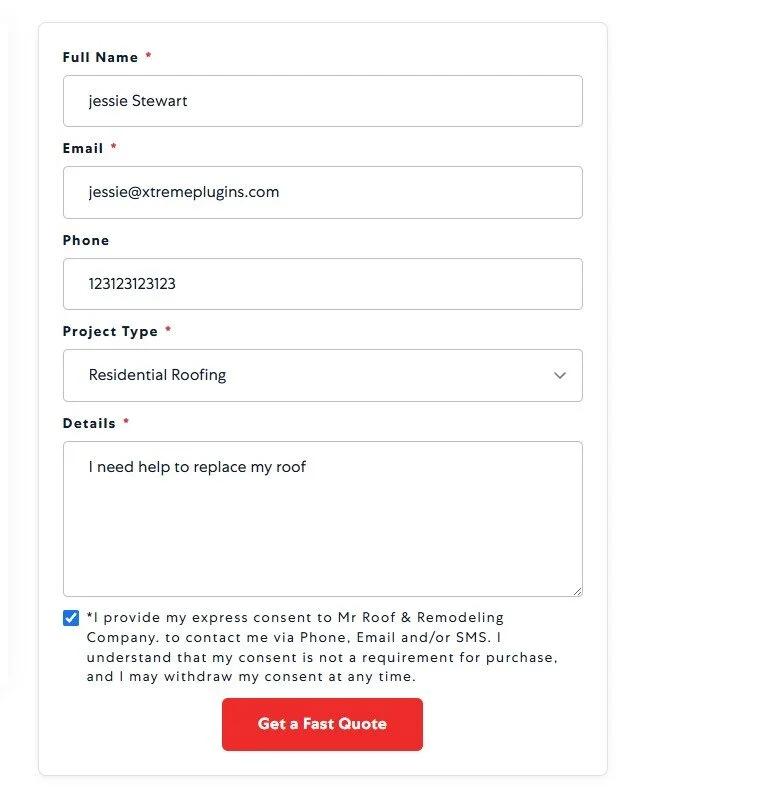
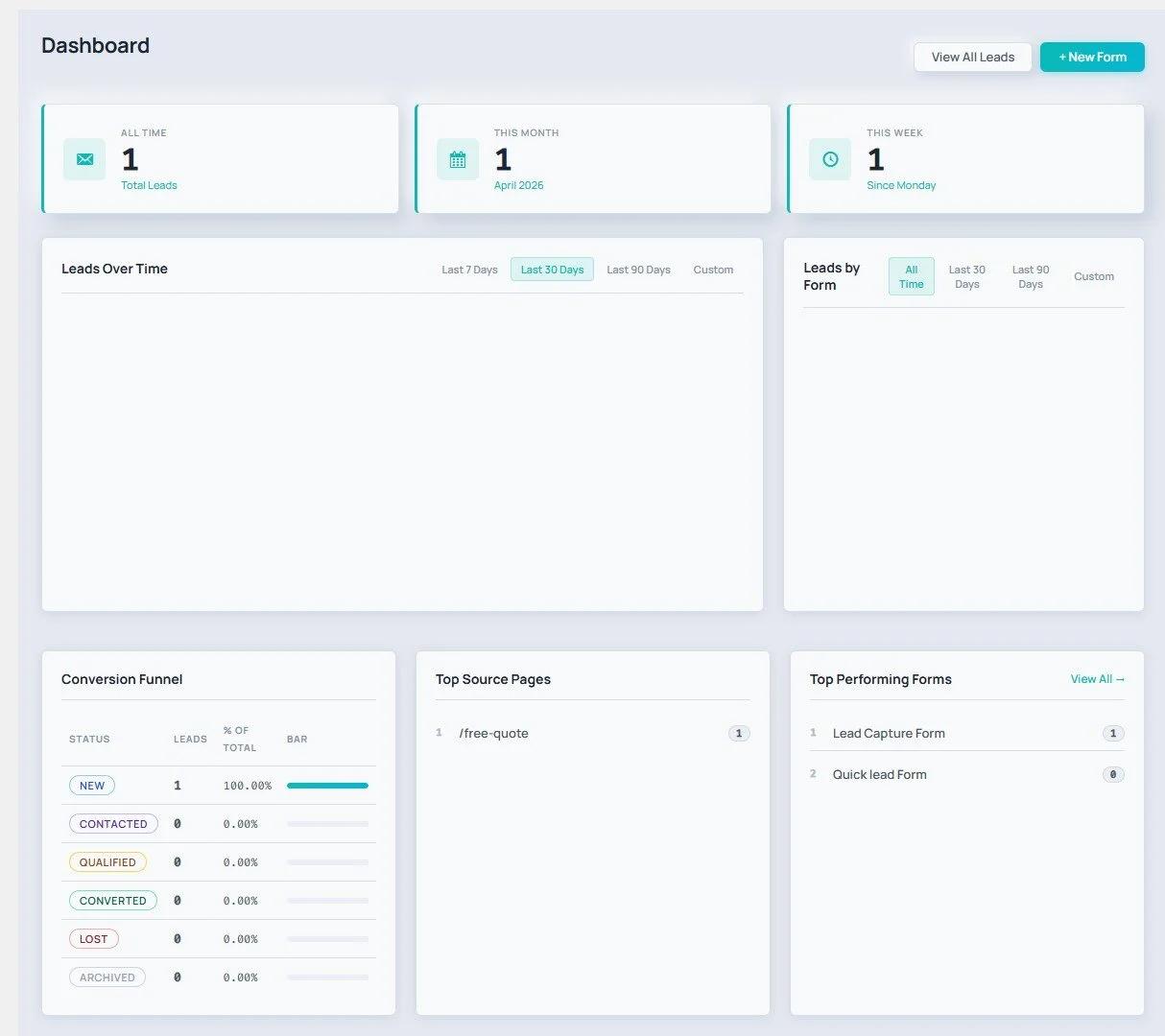
A quick look at the form builder, entries inbox, and admin dashboard.
Ready to Build Better Forms?
Forms that capture. Leads that are managed. Spam that is blocked. All in one plugin — starting at $39/yr.
30-day money-back guarantee · Instant download · Cancel anytime